FREE AI PRODUCTION CALENDAR

Turn messy production notes into a working calendar

Turn messy production notes into a working calendar

Turn messy production notes into a working calendar

Paste an email, spreadsheet, rough schedule, or bullet points. Sunny organizes the tasks, dates, stages, and owners—then lets you review every change before it is applied.

Paste an email, spreadsheet, rough schedule, or bullet points. Sunny organizes the tasks, dates, stages, and owners—then lets you review every change before it is applied.

Paste an email, spreadsheet, rough schedule, or bullet points. Sunny organizes the tasks, dates, stages, and owners—then lets you review every change before it is applied.

ONE WORKING SCHEDULE

See the whole production before the first call sheet

See the whole production before the first call sheet

See the whole production before the first call sheet

Map creative, pre-production, casting, locations, shoot, post, review, and delivery in one clear timeline. Start with the plan you already have, then turn scattered production details into a schedule your team can use.

Map creative, pre-production, casting, locations, shoot, post, review, and delivery in one clear timeline. Start with the plan you already have, then turn scattered production details into a schedule your team can use.

Sunny production calendar showing creative, pre-production, shooting, post-production, and delivery tasks across a project timeline

HOW IT WORKS

From messy production notes to a working calendar

From messy production notes to a working calendar

From messy production notes to a working calendar

01

Paste what you have

Drop in an email, spreadsheet rows, bullet points, or describe the production from scratch.

02

Let Sunny structure the plan

Sunny identifies task names, dates, stages, owners, and sequencing, then builds a clean production calendar.

03

Review the proposed schedule

Check dates, assignments, stages, and dependencies before anything is applied.

04

Refine it your way

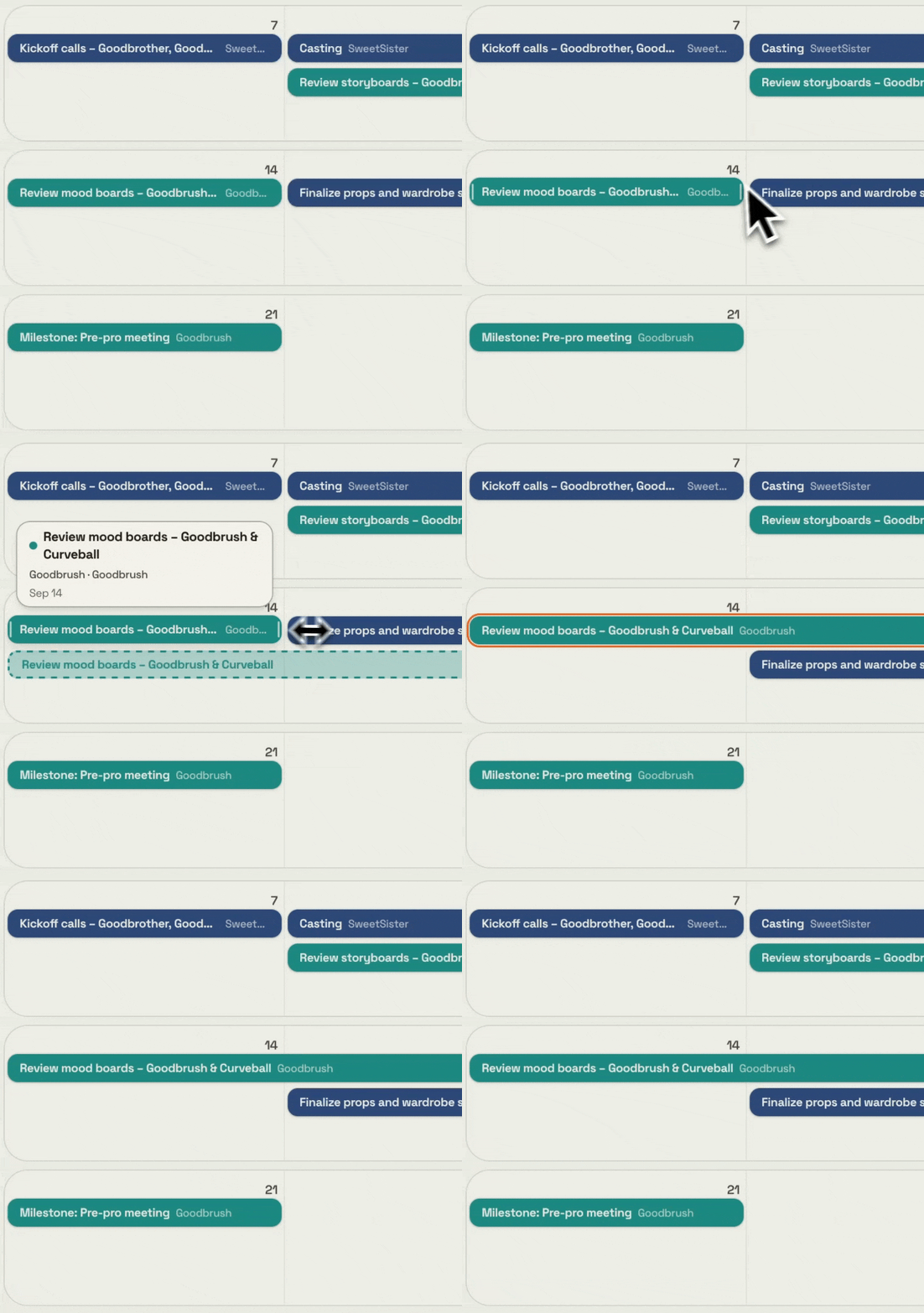
Drag and resize tasks yourself, or use plain-English instructions for larger changes.

AI SCHEDULE EDITS

AI does the tedious work. You make the final edits.

AI does the tedious work. You make the final edits.

Tell Sunny what changed. Review the impact before anything moves.

Sunny proposes the change first, shows you what will be affected, and waits for your approval before updating the calendar.

BUILT FOR CLIENT PRODUCTION TEAMS AND AGENCIES

Start with the schedule your production needs

Start with the schedule your production needs

Start with the schedule your production needs

PRODUCTION PLANNING

What is a production calendar?

What is a production calendar?

A production calendar is a high-level working schedule for a film, commercial, branded video, or other creative project. It maps the major phases of work—from creative development and pre-production through shooting, editing, review, and final delivery.

Unlike a shooting schedule, which focuses mainly on production days, a production calendar gives the entire team visibility into the full project timeline. It connects tasks, owners, deadlines, and milestones in one place.

Sunny helps you create that schedule from the information you already have, then adjust it as the production changes.
PRODUCTION CALENDAR FAQ

Practical questions before you build

Practical questions before you build

Practical questions before you build

01

How is a production calendar different from a shooting schedule?

How is a production calendar different from a shooting schedule?

A shooting schedule focuses on production days, locations, scenes, and crew logistics. A production calendar covers the wider project timeline, including pre-production, shooting, post-production, review, and delivery.

A shooting schedule focuses on production days, locations, scenes, and crew logistics. A production calendar covers the wider project timeline, including pre-production, shooting, post-production, review, and delivery.

02

Is the production calendar free?

Is the production calendar free?

Yes. You can use Sunny’s free production calendar to create and refine a working schedule. Sunny’s broader product adds connected project context from the emails, documents, and meetings around your work.

Yes. You can use Sunny’s free production calendar to create and refine a working schedule. Sunny’s broader product adds connected project context from the emails, documents, and meetings around your work.

03

Can I create a calendar from an email or spreadsheet?

Can I create a calendar from an email or spreadsheet?

Yes. Paste the content into Sunny, or describe the production from scratch. Sunny can turn rough information into structured tasks, dates, stages, and owners.

Yes. Paste the content into Sunny, or describe the production from scratch. Sunny can turn rough information into structured tasks, dates, stages, and owners.

04

Can I edit the calendar myself?

Can I edit the calendar myself?

Yes. The calendar is the primary workspace. You can drag and resize tasks, change dates, edit owners, add stages, and update notes directly.

Yes. The calendar is the primary workspace. You can drag and resize tasks, change dates, edit owners, add stages, and update notes directly.

05

Can Sunny make bulk schedule changes?

Can Sunny make bulk schedule changes?

Yes. You can describe changes such as pushing a shoot, extending casting, reassigning tasks, changing colors, or removing milestones.

Yes. You can describe changes such as pushing a shoot, extending casting, reassigning tasks, changing colors, or removing milestones.

06

Do I approve AI schedule changes?

Do I approve AI schedule changes?

Yes. Sunny shows a proposed change before applying it, especially when multiple tasks are affected.

Yes. Sunny shows a proposed change before applying it, especially when multiple tasks are affected.

WHEN THE PROJECT GETS COMPLEX

When the schedule connects to the rest of the production

When the schedule connects to the rest of the production

The free calendar helps you build and manage the schedule. Sunny brings documents, emails, and meeting content into the same project memory layer, so your team can ask what changed, find the latest source-backed detail, and open the underlying record.

Explore Sunny

READY WHEN THE SCHEDULE ISN’T

Build a working production calendar in minutes

Build a working production calendar in minutes

Build a working production calendar in minutes

Paste what you have. Review the plan. Keep control of every change.

Paste what you have. Review the plan. Keep control of every change.

Build your free production calendar

GIVE YOUR TEAM MORE ROOM TO PRODUCE.

See how production intelligence keeps project context clear, connected,
and ready when your team needs it.

© 2025 Sunny All Rights Reserved.

SUNNY

Producing is a creative act. Sunny helps keep it that way.

© 2026 SUNNY